iiNet Usage Analyser
Frequently Asked Questions
Why is iiUsage reporting "invalid XML data" when using the XML feed, and "failed to parse JSON" when using the JSON feed?
iiNet broke the JSON feed in 2022, and blocked iiUsage from accessing the XML feed in late 2022.
In early March 2023, iiNet confirmed that third-party tools will not be able to access the volume usage feeds anymore.
That means the end of iiUsage.
Thanks for everyone's support over the years.
Why is iiUsage reporting "[-2147012739] An error occurred in the secure channel support" on Windows 7?
At the beginning of July 2018, iiNet disabled TLS1 on the iiNet toolbox server. iiUsage uses WinHTTP for data retrieval,
and it defaults to TLS1, and can no longer connect to the iiNet toolbox server.
If you are using Windows 7, configure WinHTTP to default to TLS1.1 by creating the following DWORD registry setting on x64 versions of Windows 7:
HKLM\Software\Wow6432Node\Microsoft\Windows\CurrentVersion\Internet Settings\WinHttp \DefaultSecureProtocols = 2560 (decimal value)
and the following on x86 versions of Windows 7:
HKLM\Software\Microsoft\WindowsCurrentVersion\Internet Settings\WinHttp\DefaultSecureProtocols = 2560 (decimal value)
After creating that registry setting, restart iiUsage, and it should start working again.
Why is iiUsage reporting "[404] Not Found"?
You must be using iiUsage 1.2.8 or older, and have it configured to not use the iiNet XML feed.
In this mode, iiUsage is attempting to "screen-scrape" data from an old version of the
volume uage page.
As of the end of September 2012, iiNet removed this page from service, thus causing the
toolbox webserver to respond with a "[404] Not Found" error.
You will need to ensure you configure iiUsage to use the XML feed
(iiUsage 1.2.9 and later now only support the XML feed, and no longer support screen-scraping the old
volume usage page), or use the JSON feed in iiUsage 1.3.0 or later .
Why is iiUsage reporting "no data was found for your account"?
This error is caused by an iiNet server-side issue that causes the volume
usage query to fail. It is an intermittent error, and subsequent queries
for data will probably work successfully.
This is not an issue with iiUsage - this is an iiNet issue, and iiUsage is just reporting the error it is
getting back from iiNet's toolbox server.
How do I upgrade an existing installation of iiUsage to a newer version?
Installation of a newer version of iiUsage will always preserve your configuration details,
so there should be no need to re-enter any configuration settings after an upgrade,
and nor is there any need to uninstall an existing version prior to installation of a newer version.
To upgrade an existing installation, just shutdown any running instances of iiUsage,
and run the installer for the newer version.
Why is CounterSpy Anti-Spyware reporting iiSQLite3.dll as being malware?
(ref)
This is a false positive. iiSQLite3.dll is a COM wrapper for SQLite, and does
not contain any malicious code.
After some correspondance with Sunbelt Software (the makers of CounterSpy), they have updated the
definitions used by CounterSpy, and iiSQLite3.dll is no longer detected as malware.
See here for more info on iiSQLite3.dll.
Can iiUsage be used on Windows Vista?
iiUsage 1.1.4 is the first version to officially support Windows Vista.
After upgrading from an earlier version of iiUsage to iiUsage 1.1.4, when iiUsage is run for the first time,
it will ask you if all data files should be migrated to the correct location.
iiUsage 1.1.3 and earlier will work on Windows Vista, with some manual workarounds.
However, Vista locks down permissions more tightly
on the c:\Program Files\iiUsage directory, and this will cause
iiUsage to fail to write any data during a refresh.
To work around this issue, you'll need to do the following:
-shut down iiUsage
-create a new directory for iiUsage data: c:\users\username\AppData\Roaming\iiUsage
-move all data files (.htm, .sl3, .xml, .csv, .log) from c:\Program Files\iiUsage to this new directory
-change the value of the following registry setting:
HKCU\Software\iiBliink\Config\Path
to reference the newly created directory
-restart iiUsage
What about Windows 7?
iiUsage 1.2.0 is the first version to officially support Windows 7. Earlier versions of iiUsage
will report various errors during installation.
Recent versions of iiUsage should also work fine on Windows 8.
Is it possible to get iiUsage running on linux under Wine?
iiUsage version 1.2.2 and later include changes designed to ensure iiUsage will operate correctly on linux under Wine.
Refer to this guide for more details on running iiUsage under Wine.
Why does iiUsage show all my downloads as being zero?
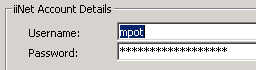
This can occur if you've specified your full email address in the iiUsage username field:
username@iinet.net.au.
It must be specified without the trailing @iinet.net.au.
Note that OzEmail users need to specify their username as
username@ozemail.com.au in iiUsage (and similarly for PowerUp and iHug users).
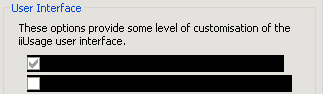
Why are the checkboxes on the iiUsage configuration dialog shown blacked out?
This can be an issue for some users on Windows XP, and is due to some bugs in Microsoft's
support for XP styles in Visual Basic.
A number of workarounds have been implemented in iiUsage version 0.3.4 and later to address these issues with
XP styles.
However, if you still experience issues with XP styles, you can remove the XP styles support
by deleting the iiNet Usage.exe.manifest
file that is in your iiUsage directory, and then restart iiUsage.
What does a red exclamation in the systray icon mean?
This indicates iiUsage failed to retrieve your volume usage data from iiNet's website.
Hold your mouse over the systray icon to see the error details in the tooltip, or check
the status bar of the iiUsage main window for details.
How can I configure iiUsage to retrieve data through a proxy server?
iiUsage 0.3.4 and earlier versions will use the proxy configuration defined in the Internet applet in
the Control Panel. Just configure your proxy server there, and iiUsage will then use
the specified proxy server.
iiUsage 1.0.0 and later versions allow a proxy server to be specified in iiUsage's configuration
settings, and also allow a proxy username and password to be optionally specified,
if the proxy requires authentication.
What does "Error retrieving data: empty response" mean?
This error indicates there's a problem with iiNet's volume usage server, and it's
not returning any data to iiUsage.
What does "Error processing data: iiNet software error" mean?
iiUsage failed to parse the volume usage data from iiNet. This error typically indicates
the setup of your account hasn't been completed by iiNet.
Try again in a few hours, or tomorrow.
Why are the totals and averages displayed by iiUsage different than those
displayed on iiNet's volumeusage page?
iiUsage recalculates all the totals, as the volumeusage page sometimes shows
inaccurate totals.
The volumeusage page shows averages rounded to the nearest day, while iiUsage
calculates the average based on the elapsed proportion of the current day, and
hence provides more accurage average values.
How do I configure iiUsage to monitor multiple iiNet accounts?
You can either run multiple instances of iiUsage, with each monitoring a different account,
or you can use a single instance of iiUsage to view details for multiple accounts.
The default user account is considered by iiUsage to be user profile 0. To create another
user profile, run iiUsage from a command prompt, telling it which profile to use:
"iiNet Usage" /p1
and specify the username and password for that account. The profile number can range from
0 (the default profile) to 20.
Note that you'll need to enable the Allow multiple instances
option if you want to be able to run multiple instances of iiUsage concurrently.
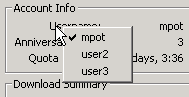
Once you've configured iiUsage with multiple accounts, you can change the current account
by right-clicking on the Username label on the main form,
and selecting another username from the resulting popup menu.
Note that iiUsage will only refresh the usage information for the currently selected
user account.
Why does the iiUsage installer ask me to reboot my PC after installation is complete?
The iiUsage installer needs to install/update some core VB runtime files, as well as
some MDAC files. If any of these files are in use during the installation,
the installer cannot replace them, and hence needs a reboot to be able to replace the
files which were in use.
What are the "iiBliink", "iiXML2", "iiJSON" and "iiSQLite3" components that are mentioned on
the Version History page?
"iiBliink" refers to the iiBliink.dll that is installed
as part of iiUsage.
It is a COM DLL written by Martin, and contains the functionality used for retrieving
data from iiNet's website, and parsing it (ie, screen-scraping the HTML).
This functionality was written as a COM DLL to allow third-party applications
to access parsed iiNet volume usage data easily, and with minimal coding.
"iiXML2" refers to the iiXML2.dll that is installed with iiUsage,
and is a COM DLL written by Martin, providing functionality for retrieving
data from iiNet's XML feed.
"iiJSON" refers to the iiJSON.dll installed with iiUsage,
and is a COM DLL written by Martin, providing functionality for retrieving data
from iiNet's JSON feed.
"iiSQLite3" refers to the iiSQLite3.dll which is also
installed as part of iiUsage.
It is a COM DLL wrapper for SQLite,
an extremely small self-contained database engine.
The wrapper is essentially a recompiled version of
Edmunt Pienkowsky's LiteX automation wrapper,
compiled with the latest available version of SQLite.
How do I re-enable the SMS link on the systray right-click popup menu?
iiNet's iiBroadband accounts no longer include any free SMS credits, so the
link to the SMS page
has been removed.
However, if you are still on a legacy plan, and want to re-enable this menu option,
you can do so by creating the following REG_SZ registry entry:
HKCU\Software\iiNet Usage\URLSMS
with a value of
http://iiUID:iiPWD@sms.iinet.net.au
Note that you should NOT replace iiUID:iiPWD with your actual
login details - iiUsage will do that for you whenever you select the "SMS" menu item.
You'll need to restart iiUsage for this change to take effect.
How do I configure the iiUsage installer to create a log of all installation activities?
You can get the installer to log all activities by running it with an appropriate command line
parameter, telling it hte name of the log file to create during installation:
iiUsage1.2.5.exe /log=c:\iiInstall.log
This will create a log file called iiInstall.log in the root directory
on C: drive.
How do I configure iiUsage to write debug info to a log file?
iiUsage can be configured to write detailed debug information to a log file for
support purposes. The following DWORD registry entry must exist
with a value greater than 0 (valid values are 0 to 10, with 10 resulting in the most detail):
HKCU\Software\iiNet Usage\debug
The following optional DWORD registry entry can be used to
specify the maximum log file size (in KBytes, with a default value of 1024KB):
HKCU\Software\iiNet Usage\logsize
The debug log file is called debug.log, and will be located
in your iiUsage data directory. When the log file reaches the maximum size, it will
be renamed to debug.old, and a new log file will be created,
so iiUsage will maintain a maximum of two log files.
Details of the current debug configuration can be viewed on the "Other" tab of the configuration dialog in iiUsage.
Which database does iiUsage use for storing historical data?
iiUsage uses an SQLite database
for storing historical data, with an updated version of
Edmunt Pienkowksy's LiteX SQLite wrapper.
SQLite provides a small, fast and reliable data storage mechanism that is very robust,
with all writes to the database being handled through transactions.
What language is iiUsage written in?
iiUsage is written in Visual Basic 6.0, and uses the WinHTTP for web
data retrieval, ADO for parsing the HTML data, and MSXML for parsing XML data.
iiUsage makes extensive use of various Win32 API calls.
What does iiUsage use for displaying graphs?
iiUsage uses the extremely powerful TeeChart Pro
charting component, from Steema Software.
Steema Software kindly donated a TeeChart Pro ActiveX v6 developer license.
Can I get a copy of the iiUsage source code?
Sorry, no. The original author of iiUsage, Tim Hall, always maintained that the source
shouldn't be made available, and Martin continues to support that stance.
However, if you are interested in writing your own application which uses iiUsage data,
the functionality for retrieving and parsing the volume usage data has been
encapsulated into a re-usable COM object.
Contact Martin for more information and sample code
demonstrating its use.
Where does iiUsage store its data files?
iiUsage 1.1.3 and earlier stored all data files in the iiUsage installation directory,
which defaults to
c:\Program Files\iiUsage\
iiUsage 1.1.4 and later versions store all data files in
%APPDATA%\iiUsage\
On Windows 2000 and Windows XP, this will be
C:\Documents and Settings\username\Application Data\iiUsage\
On Windows Vista and Windows 7, this will be
C:\users\username\AppData\Roaming\iiUsage\
To find/view this directory, just go Start -> Run -> type "%APPDATA%\iiUsage" and hit Enter.
How can I save my historical iiUsage data when re-installing Windows / migrating to another PC?
All iiUsage historical data is stored in an SQLite database (if historical data storage is enabled).
This database file can simply be copied onto another PC, into the iiUsage data directory.
iiUsage versions upto 1.1.13 used c:\Program Files\iiUsage\, while
iiUsage version 1.1.14 and later use %APPDATA%\iiUsage\ for storing data files.
If you are unsure which directory iiUsage is using for storing data files, it is specified in the following registry key:
HKCU\Software\iiBliink\Config\Path
I reckon I've found an undocumented feature / bug. How do I report it?
Confirm that you have the latest available version of iiUsage, and if not,
please install the latest version, and see if the issue still exists.
Please refer to the Feedback page for information on
submitting feedback to the iiUsage developer, Martin.
How do I express my appreciation for all the countless hours that Martin
puts into maintaining and developing iiUsage?
You can show your appreciation in various ways.
last updated 24 Mar 2026
|