posted Monday, 28 December 2009, 18:38 (+0800), by Martin

Phottix Aster box
Intro
The Phottix Aster is a new product from the Asian Phottix, and it has some interesting features not found in the Phottix Tetra (I reviewed the Phottix Tetra several months ago).
The Phottix Aster is designed for triggering one or more off-camera flash units, either wirelessly from the transmitter, or optically from any other flash.
Thanks to HK Supplies for providing a Phottix Aster for review purposes.
Wireless Flash Remotes?
A wireless flash trigger is designed to trigger one or more flash units that are located away from the camera, without requiring a wired connection between the camera and the flash units.
Off-camera flash allows a photographer to get much more creative with lighting, and the Strobist website has served to educate many more photographers in the use of off-camera flash lighting.
Features and Specifications

Aster receiver (left) and transmitter (right)
Features:
- wireless mode - remotely trigger receiver with transmitter on camera hot-shoe
- light mode - optically trigger receiver from another flash
- 4 wireless channels
- PC sync input on transmitter
- PC sync output on receiver
| Transmitter battery | 12V / 23A |
| Receiver battery | 3V / CR2 |
| Frequency | 433 MHz |
| Sync Speed |
1/125 - 1/250 sec (dependant on flash units and camera) |
| Range (wireless mode) | 30m in open areas |
| Range (optical mode) | 10m |
Note that the Aster (and most other third-party flash triggers) do NOT provide any support for Canon's ETTL or Nikon's iTTL functionality. These triggers simply provide a means to remotely trigger a flash, but you need to set the flash output manually.
For wireless flash triggering that supports ETTL, you need to look at much more expensive solutions, including some of the newer PocketWizards, Radio Poppers, the recently announced remotes from Pixel, or the Phottix Odin (all use RF communications).
Alternatively, for Canon gear, you can either use the dedicated Canon ST-E2 wireless trigger, or use a Canon 580EX flash to remotely trigger other Canon flashes (both the ST-E2 and 580EX use infrared/visible light, rather than RF for communications, so range is reduced, and you need line-of-sight).
Compatibility
Phottix provide the following list of compatible flashes that can be used with the Aster:
- Canon Speedlites: 430EX II, 580EX, 580EX II
- Nikon Speedlight: SB-28DX, SB-600, SB-800, SB900
- Sony HLV-F56AM
- Pentax AF-540FGZ
- Samsung SET-36ZF
- Olympus FL-36
- YN 460
- Vivitar 3200A, SB-4/283
In all cases, it worked as expected, with no compatibility issues experienced at all.
Overview of the Aster
The contents of the box included:
- 1 x transmitter (battery pre-installed)
- 1 x receiver
- 3V CR2 battery for receiver
- PC sync cable (3.5mm plug and PC sync connector)
- PC sync cable (3.5mm plug on both ends)
- 1/4" to 3.5mm adaptor
- silica gel packet (to keep moisture out of the box)

components included in the box
Aster Transmitter
The Aster transmitter is a similar size to most other wireless flash transmitters. A four-position channel switch can be found on one side, while the other side has a 3.5mm PC sync socket, and the power switch.
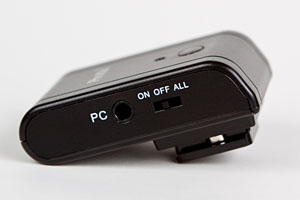
one side of the Aster transmitter:
PC sync and power switch |
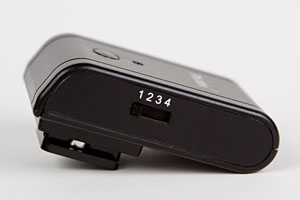
other side of the Aster transmitter:
channel selection switch |
The power switch has three positions:
- On: use the transmitter on the channel specified by the channel switch
- Off: powered off
- All: use the transmitter to trigger Aster receivers on all four channels
(this could be fun if there are other people using Aster removes in the vicinity)
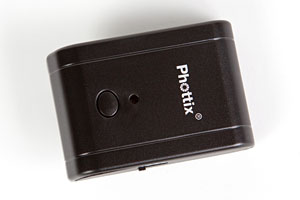
top of the Aster transmitter:
test button and power LED |
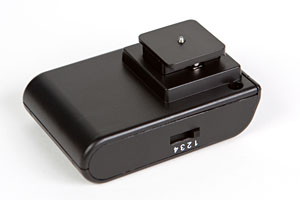
bottom of the Aster transmitter:
hot-shoe mount |
The top of the transmitter has a test button (useful for testing a remote flash), and a status LED.
The hot-shoe mount on the bottom of the Aster transmitter doesn't have a locking ring, but relies on a spring-loaded metal contact to hold it firmly on a camera's hot-shoe.
I didn't find the absence of any locking mechanism to be an issue, as the transmitter is so small and light, it won't become dislodged from the camera's hot-shoe easily.
Aster Receiver
The Aster receiver is a much lower profile unit than the Tetra receiver I tested some months ago.
One side of the receiver has a 3.5mm PC sync socket, channel selector switch, and the power switch. The power switch allows different modes to be selected, with "W" indicating wireless mode, where the Aster receiver will be triggered by any Aster transmitter configured to use the same channel.
"L" mode ("L" for "light") changes the behaviour of the receiver, causing it to be triggered optically by another flash.
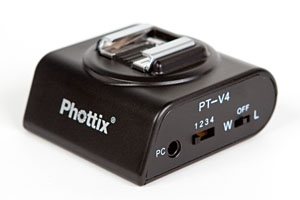
switches on the Aster receiver
|
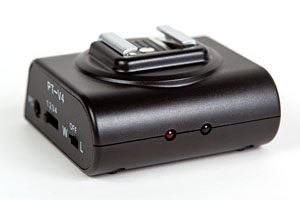
status LED and light sensor
|
The front of the Aster receiver has two LEDs. The red LED on the left is the status LED, which will flash when the receiver is triggered. The LED on the right is the light sensor used for optical triggering.
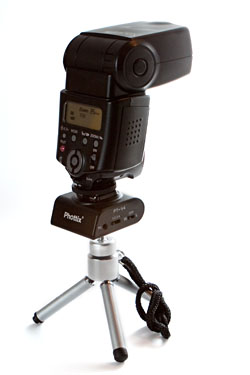
Canon 430EX flash on Aster receiver
on small tripod |
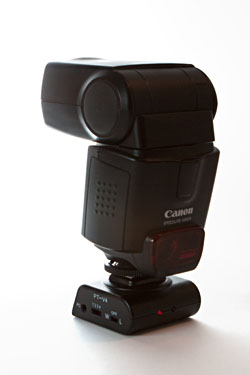
Canon 430EX flash on Aster receiver
|
I prefer the low-profile Aster receiver to the much taller receivers from other wireless flash triggers (including the Cactus V2 PT-04 and the Phottix Tetra PT-04 II).
With the Cactus and Tetra receivers, I resorted to using a cheap clamp to hold the receiver separately from the flash, rather than mounting the flash on top of the receiver.
However, with the Aster, there's no need to do this, as the Aster receiver provides a much more stable base for mounting a flash.
The bottom of the receiver has a 1/4" metal socket, useful for mounting the receiver on a tripod or light stand.
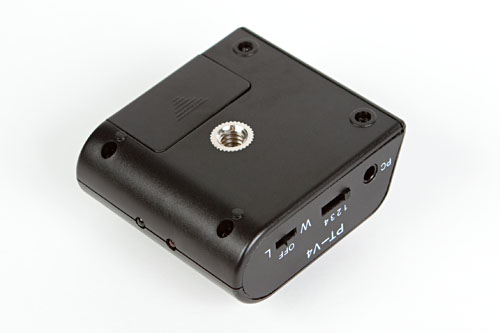
underside of the receiver, showing the threaded 1/4" socket
However, without a cold-shoe mount on the bottom of the receiver, you may need adaptors to mount it on top of light stands or flash clamps.
Triggering the Aster Wirelessly (with the Transmitter)
Setting the receiver's mode switch set to "W" (ie, "wireless" mode) will allow the Aster transmitter to wirelessly trigger it.
During testing, I found wireless triggering to be reliable.
However, I did find that switching the transmitter on, as well as the act of toggling the receiver between W and L modes tended to trigger a flash that was on the receiver's hot-shoe. This can be disconcerting if you're not expecting it and have the receiver near your face while you are adjusting the switches on it.
Triggering the Aster Optically
With the receiver's mode switch set to "L" ("L" for "light"), it will be optically triggered by a flash that is registered by the detector on the front of the Aster receiver.
This means it can be triggered by any other flash, thus removing the need to use the Aster's transmitter on the camera's hot-shoe.
However, I've found that the pre-flash performed by a Canon flash in ETTL mode causes the Aster receiver to be triggered before the camera shutter is open.
However, a Canon flash in manual mode can be used to trigger the Aster receiver optically.
This is quite limiting, as it reduces the effectiveness of the optical triggering functionality. I suspect this is a limitation of other optical triggers too.
Cable Options
The Aster transmitter has a 3.5mm PC sync socket, and this can be used as an alternative to the transmitter's hot-shoe mount. This can be useful if your camera body has a PC sync socket, and you have another device mounted in the camera's hot-shoe.
The Aster receiver also has a 3.5mm PC sync socket, allowing it to trigger devices via a PC sync cable in addition to, or instead of via the receiver's hot-shoe.

cables
The Phottix Aster comes with two cables - one with a 3.5mm plug at both ends, and the other terminated with a 3.5mm plug at one end, and a PC sync plug at the other end. The Aster also comes with a 1/4" to 3.5mm adaptor, for allowing the receiver to be connected to studio lights with a 1/4" socket.

Aster receiver triggering Canon 580EX II flash via PC sync cable
Availability
The Phottix Aster can be purchased from Phottix's recently opened online store.
At the time of writing, prices were as follows
- AUD$48.82 (USD$43.14) for one transmitter and one receiver (item link)
- AUD$32.54 (USD$28.76) for receiver (item link)
The Verdict
The build quality of the Aster is very good - certainly much better than that of the early Cactus V2 PT-04 remotes.
I really like the low profile receiver, as it is much more stable than a tall receiver when it has a flash mounted on the receiver hot-shoe.
Optical triggering could be handy, although I probably won't use it much (and note that it'll only work when triggered by flashes in manual mode, as the ETTL pre-flash will trigger the receiver before the camera's shutter is open).
The lack of a cold-shoe mount on the receiver may be a limitation for some people.
Ideally, I would like to see a variation that retains the low-profile receiver, but uses more commonly available batteries (such as AAA) in the receiver.
The Phottix Aster provides a very good value-for-money solution for people looking at off-camera flash photography.
Update (8 January 2010): Some additional comments about the Aster transmitter:
Changing the battery in the transmitter is a non-trivial exercise! After removing the two screws holding the transmitter together, the top and bottom halves should separate. However, the labels on each side of the transmitter hold the two halves together. You need to peel the labels off one of the halves in order to be able to open the transmitter.
After doing so, the labels are unlikely to stick down properly, and are likely to have kinks in them from being bent during their removal.
Phottix have advised that they are now using a half-sized label that only covers the lower half of the transmitter, to ensure the transmitter can be opened more easily.
The Aster can be purchased online from Phottix's online store.


Nice review. Its very useful to me. Keep up the great work, you are providing a great resource on the Internet here!