posted Saturday, 22 November 2008, 20:45 (+0800), by Martin
Background
Until recently, my primary camera was a Canon 350D, which uses a 2.5mm stereo socket (E3) for connecting a shutter release. I built a homebrew shutter release for it, which worked very effectively.
Having recently upgraded to a Canon 50D, I can no longer use my homebrew shutter release, as the 50D has an N3 socket, rather than an E3 socket (2.5mm stereo socket). Rather than purchase a complete shutter release for the 50D, I did some research, to see if I could source an N3 connector, so I could modify my shutter release, and add an N3 connector to it.
Shutter Release Connections for Canon EOS DSLRs
Canon's low-end DSLR cameras (300D/350D/400D/450D) use an E3 socket for connecting remote shutter releases to the camera. An E3 socket is just a 2.5mm stereo socket. If you want to build your own shutter release, suitable 2.5mm stereo plugs can easily be purchased from most electronics stores.
However, the mid-to-high end Canon DSLR cameras (10D/20D/30D/40D/50D/5D/1D) all use Canon's proprietary N3 connector.
This post provides more details on the N3 connector, including pinout details, and information on sourcing an N3 connector.
The N3 Connector
The images below show the N3 socket on a Canon 50D body (with the protective rubber cover lifted out of the way), and an N3 plug on a third-party shutter release.

Canon N3 socket on 50D body
(top connector is a PC-sync socket) |

Canon N3 plug
(on a third-party remote shutter release) |
Pin-Out
The N3 connector has three electrical connections, as shown in the image below.

N3 socket pinout (looking at socket on 50D camera body)
Shorting the focus pin to the ground pin is equivalent to depressing the camera's shutter button half way down, and will cause the camera to focus. Shorting the shutter pin to the ground pin is the same as fully depressing the shutter button, and will cause the camera to take a photo.
For reference, I've reproduced the pinout details of the E3 2.5mm stereo socket used on the lower-end Canon DSLR cameras.
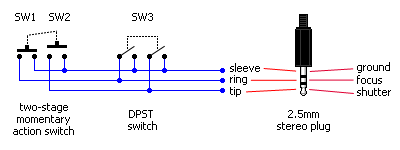
pinout of the homebrew remote I built for my 350D
Sourcing a N3 Connector
As far as I'm aware, you cannot purchase bare N3 connectors anywhere. However, there are several ways that you can get hold of an N3 connector, and they are:
- Buy a genuine Canon remote.
Canon makes several remote triggers designed for use with Cameras that have an N3 connector, including:- Canon RS-80N3,
available for USD$50 from B&H or AUD$89.99 from Quality Camera - Canon TC-80N3 remote timer,
available for USD$137 from B&H or AUD$280 from Quality Camera - Canon LC-5 wireless controller,
available for USD$430 from B&H or AUD$749.99 from Quality Camera
- Canon RS-80N3,
- Buy a genuine Canon or Pocket Wizard/etc cable.
A number of cables are available with an N3 plug on one end, and various other connectors on the other end. These include:- Pocket Wizard CM-N3,
available for USD$113 from B&H or AUD$132 from Quality Camera
(1m long, with N3 plug and mono 2.5mm plug), - Canon ET-1000N3,
available for USD$79 from B&H
(10m long, with N3 plug and N3 socket), - Canon RA-N3,
available for USD$45 from B&H
(short, with N3 plug and older-style T3 socket).
- Pocket Wizard CM-N3,
- Buy a cheap remote from eBay.
There are many cheap third-party remotes available on eBay, but the quality can be variable. - Make your own N3 connector.
There are a couple of ways you can build your own N3 connector:
I'll be posting more details about my shutter release solution in the near future.
Update (January 2008): I've posted more details about my search for a Canon 50D Remote Shutter Release, as well as a review of the Yongnuo remote shutter release that I purchased.


Hmmm, making your own connector...thanks for the ideas...not for this purpose but other projects. I am excited to se your own personal solution!