discussion, gear, and photography journal
Quality Camera Sales Australia
Phottix Cleon II
Phottix Cleon II
Intro

I recently reviewed the Phottix Cleon wireless remote, which was released by Phottix in February 2008. Since that time, Phottix have not been resting on their laurels, but were busy designing a new and improved version.

A new model, the Phottix Cleon II, was released earlier this year, in January 2009. It provides a number of improvements and enhancements since the Cleon.

Thanks to HK Supplies for providing a Phottix Cleon II C8 for review purposes.


This Review: Differences between Cleon and Cleon II Only

Most of the functionality of the Phottix Cleon II is the same as that of the Phottix Cleon. Having recently reviewed the Cleon, rather than duplicating much of the information from the Cleon review in this Cleon II review, please refer to my earlier review of the Cleon.


Overview of the Cleon II

The size and shape of the Cleon II transmitter and remote are identical to the previous model, the Cleon. However, there are a number of differences in the functionality of the Cleon II.

The back of the Cleon II transmitter indicates the model is "WXD-189", and this review looks at the C8 model of the Phottix Cleon II wireless remote, which comes with a cable that has an N3 connector to suit Canon 20D/30D/40D/50D/5D/1D cameras. I'm testing it on a Canon 50D body.

components: receiver, transmitter, camera cable, battery, wrist strap and clip

One of the immediately obvious differences between the Cleon and the Cleon II is the fact that the Cleon II does not have the receiver cable hard-wired into the receiver. Instead, one end of the receiver has a 3.5mm stereo plug, which goes into a corresponding 3.5mm stereo socket on the receiver.
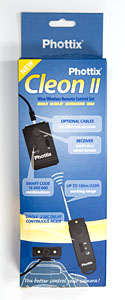
Cleon II packaging
Cleon II packaging
This allows Phottix to manufacture a single model of receiver, and just provide different cables to suit different model cameras (this approach has also been taken with the Phottix Nikos digital timer remote).

I'll be taking a closer look at other differences between the Cleon and Cleon II in subsequent parts of this review.

A quick search on eBay indicates the Phottix Cleon II typically retails for about AUD$56 (approx USD$36), which is about AUD$10 more than the previous model Cleon.

Update: Phottix are now selling the Cleon II via their recently launched their online store.


Features and Specifications

Specifications (as listed on the packaging):

Name of Product Transmitter Receiver
Power 12V / 23A 3V / CR2
Life of Battery up to 3 years 20,000 Times
Smart Code System   16 000 000 combination codes
Range 100m (320ft) without obstacles
Monitor Light Two color LEDs   Two color LEDs  
Frequency 433 MHz


Differences Between Cleon and Cleon II

To summarise the differences between Cleon and Cleon II, I've listed them in a table. Note that this table does not include functionality that exists in the Cleon and in the Cleon II; it only lists the differences between the two models.

Name of Product Cleon Cleon II
release date February 2008 January 2009
frequency 315 MHz 433 MHz
number of channels 16
(set with DIP switches)
16,000,000
(preset in transmitter)
transmitter-camera cable hard-wired into transmitter   removable with 2.5mm plug
transmitter antenna length   75 mm 125 mm
2S switch configured on receiver configured on transmitter
multiple frames option none configured on transmitter
receiver power switch 4-position slide switch hold down on switch for 3 seconds
terminate wireless bulb mode   half-press on transmitter half-press or full press on transmitter  


Synchronising the Transmitter and Receiver

The Cleon II supports 16,000,000 different channels, and I found that I had to synchronise the receiver and transmitter before they would communicate. Once this synchronisation operation has been completed, it shouldn't be necessary to re-synchronise each time you use the Cleon II.
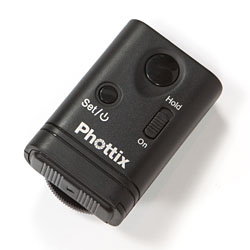
receiver
receiver
transmitter
transmitter

To check if the transmitter and receiver are synchronised, turn on the receiver. Holding down the "set/power" button on the receiver for approximately three seconds will turn it on, and the red LED on the left hand side of the receiver should turn on.
Move the mode switch on the transmitter to "S/B" and hit the shutter button on the transmitter. If no LEDs light up on the receiver, then you'll need to synchronise them using the procedure described below.
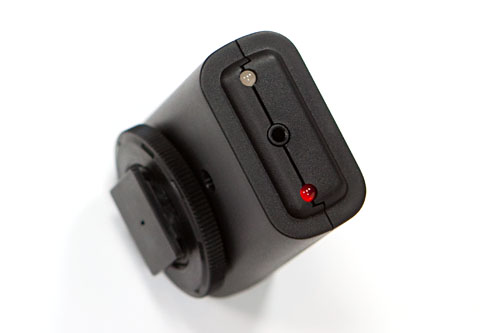
receiver, showing two status LEDs and socket for camera cable

To synchronise the receiver to the transmitter:
  • turn receiver on by holding down "set/power" button for ~3 seconds until right hand side LED turns on
  • press "set/power" button on receiver 5 times until LED on left hand side flashes red
  • press shutter button on transmitter
  • LED on left hand side of receiver should turn off
Now that the synchronisation has been completed, half-depressing the shutter button on the transmitter should result in the LED on the left hand side of the receiver going green, and a full press of the button should result in this LED going red.

Note that multiple receivers can be programmed to respond to a single transmitter, allowing you to trigger multiple cameras with a single transmitter.

After removing the receiver's battery for several minutes, I re-installed it, and confirmed that the receiver was still synchronised to the transmitter, so it appears that the synchronisation is a once-off exercise that won't need to be repeated (unless you want to synchronise the receiver to a different transmitter).


Using the Cleon II

As with the original Cleon, the receiver can be used as a dumb wired remote, using the shutter button on the receiver. Moving the receiver mode switch to "Hold" allows it to be used for long bulb-mode exposures without having to hold the shutter button down.
Note that there is no need to power on the receiver when using it as a wired remote.

using the receiver as a wired remote

When using the Cleon II in wireless mode, the plastic hotshoe connector can be used to mount the receiver on your camera's hotshoe, either facing forwards or backwards.
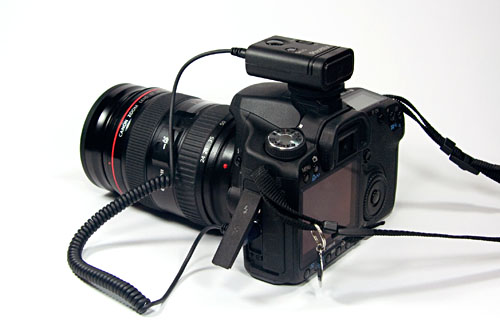
receiver mounted on the camera hotshoe

The receiver's mode switch needs to be set to "On", the receiver powered on (by holding the "set/power" switch down for three seconds until the power-on LED lights up), and the transmitter can then be used to trigger the receiver.
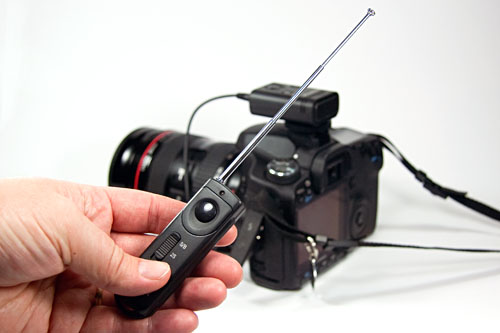
using the Cleon II wirelessly

The transmitter's mode switch allows three different modes to be selected:
  • S/B - single exposures or bulb mode (hold transmitter button down for 3 seconds to lock the shutter open in bulb mode)
  • 2S - single exposures with a 2 second delay
  • multiple exposures - when triggered by transmitter, receiver will take 5 exposures

Cleon II is Better Than Cleon Because...

After having reviewed and compared the Cleon and Cleon II, I believe the Cleon II is definitely an improvement over the Cleon, for the following reasons:
  • auto code setting with 16,000,000 possibilities, no DIP switches required
  • no unnecessary power-off switch on transmitter
  • receiver cable is not hard-wired into receiver
  • 2S (2 second delay) mode is now selected on transmitter, not receiver
  • 5 frame setting on transmitter
  • transmitter antenna is longer, and should provide a longer range
  • wireless bulb mode can be terminated with half-press or full press on transmitter
transmitter with antenna fully extended

Regarding the last item in the list above, with the Cleon, a half-press on the transmitter button is required to terminate bulb mode. This is not particularly intuitive, and a full press on the transmitter button has no effect.

However, with the Cleon II, either a full-press or a half-press on the transmitter button will terminate bulb mode, and this is a bit user-friendlier.


Verdict

There's still no way to hang the receiver from your tripod if your camera's hotshoe is occupied with a flash or a flash trigger. However, that can be fairly easily rectified by drilling a small hole in the receiver case to attach a small lanyard, or tying something to the hotshoe adaptor on the receiver.

The Phottix Cleon II has numerous improvements over its predecessor, the Cleon, so if you are intending to purchase a Cleon, be sure to order the Cleon II, rather than the superseded Cleon.
Comments:
digital photography wrote at 2009-03-24 22:51

well, this is not only a good review, but also a tutorial for use... I was looking into this things, but was scared to plug cheap devices into my 50D... but as I can see they work just fine... so I might give it a go.

Have u by any chance tried wireless flash trigger? by same HK supplies?

Martin wrote at 2009-03-24 23:03

@digital photography: Thanks for the feedback.

Re the wireless flash trigger, I have a Phottix Tetra wireless flash trigger on my desk. However, I'm holding off with my review, as Phottix have advised that they are releasing an updated version in the very near future.

Terry Smith wrote at 2009-03-26 16:33

This is a great review and great tutorial. Thanks for posting this. I've been researching the various models, and your comparison of the Cleon to the Cleon II is exactly what I needed.

Paula wrote at 2009-03-31 23:59

This was a very good review, and I especially enjoyed the comparison between the first Cleon. I am very excited about Cleon II's new ability to hook up to other cameras. Do you think that there is a cable that will work between the Cleon II and a Canon Rebel XS?

Martin wrote at 2009-04-01 00:05

@Paula: thanks for the feedback.

The Canon Rebel XS (also known as the Canon 1000D in other markets) has a 2.5mm socket for a remote shutter release.
The Cleon II C6 has the appropriate cable to suit the Rebel XS.

Ananda wrote at 2009-04-03 08:25

I live in Belgium and I'd appreciate your telling me via my e-mail address where I can get this Cleon II toy for my Canon 40D. Any safe URL or address is okay, but not eBay.
Thanks in advance.
Ananda

Martin wrote at 2009-04-03 08:32

@Ananda: if you're not keen to buy on eBay, I would suggest you contact HKSupplies.com, a sister-company of Phottix.

Bill wrote at 2009-04-04 03:48

Great review on the Cleon II. Thanks. I just received mine and it works great.
Regarding the Phottix wireless flash trigger do you know if the model PT-04-II which HK now have on Ebay (labelled "NEW") is the updated model you referred to in your 2009-03-25 post?

Martin wrote at 2009-04-04 04:40

@Bill: thanks for the feedback.

Re the Phottix wireless flash trigger, yes, it's the Tetra PT-04II. I'll be publishing a review on them in the next few weeks.

Ananda wrote at 2009-04-04 10:43

Martin,
Thanks for your feedback. And surprise, surprise: I tried google again, using a different word order and... lo and behold! I've found a dealer here in Belgium! In fact, even two!
In case any Belgian reader is looking for that url: here it is.
Now I'm going to reread everything your site offers about this Cleon gem.

Martin wrote at 2009-04-04 11:31

@Ananda: thanks for the followup - hopefully that URL will be useful to other Belgian visitors too.

Iztok wrote at 2009-04-10 11:41

Great review, Martin! I just wonder about effective range. Is it really 100m also in practice? Thank you!
Iztok

Ananda wrote at 2009-04-10 17:46

Martin, I got my Phottix Cleon II this morning. Everything but the camera worked fine. I did not understand. I wanted to use the 2 sec delay, and just as I was used to do with my other Canons (350DX, G5) and with my previous remote (Twin1 R2-SRC), I switched the camera to the second-2 self-timer position. The camera refused to do its job. I went to the shop and was told I should not switch the camera to the self-timer position. And indeed, problem solved! And have you also noticed there is no-self-timer light? As not everybody goes through this kind of feedback, perhaps you could mention it somewhere where you discuss how to use it.
Kind regards.
Ananda

Martin wrote at 2009-04-14 11:28

@Iztok: I haven't tested the range yet, but am intending to do some comparison testing of the range of the Cleon, Cleon II, Plato, and Hero wireless remotes in the next couple of weeks, and will write up the results in a blog post.

@Ananda: as you found out, if you want to use the 2 second delay, you need to rely on the Cleon II to handle the delay, rather than the camera. The 2 second delay option is turned on by moving the transmitter's mode switch to the "2S" setting, and then pressing the Cleon II transmitter's shutter button will result in a 2 second delay before the Cleon II's receiver will trigger the camera.

You also said there is no self-timer light. However, when using the 2 second delay, the left LED on the Cleon II receiver will flash red during the 2 second delay, and will then extinguish once the camera's shutter has been triggered.

CAN KOCAK wrote at 2009-04-22 17:14

I fall in love with this product
PHOTTIX-WXD-189

KING REGARDS FOR PROCUCER

Karsten wrote at 2009-04-26 22:31

I found your review and tutorial very informative and helpful. I would like to order the Phottix Cleon II but am having problems locating them. I checked your link to the HK site and did a search for the product and it come up with nothing. There seems to be plenty of the Cleon models but I would prefer the Cleon II. Anything in Canada or US would be great.

Thanks in advance. I also find your site very informative on other issues as well. Thanks for taking the time to share your experience and information.

Martin wrote at 2009-04-27 01:34

@Karsten, thanks for the comments.

HKSupplies also sell a lot of items on eBay. Have a look at the HKSupplies eBay store - they definitely have the Cleon II listed on eBay.

Alternatively, there should be other resellers of Phottix gear in various locations.

David wrote at 2009-05-11 23:47

Martin,
Have you have a chance to check out the Phottix Plato yet compared to the Cleon II?

Martin wrote at 2009-05-11 23:50

@David: I have a Plato for review (actually, two, but that's a long story...), and have done some testing with it.

However, I'm currently working overseas for a couple of weeks, so I won't be in a position to complete my review for at least a few weeks.

Liew Cheon Fong wrote at 2009-05-17 00:12

thanks for the review. was about to order Cleon, now I decided on Cleon II :)

Ron B wrote at 2009-05-19 01:16

The Cleon II N8 works like a charm on my D700 & D300. Only had to redo the frequency to match it up between the transmitter & receiver to make it work & thanks to this review & forum, I was able to do it much more easy than trying to do it by the package directions.

Karl von Valtier wrote at 2009-05-20 20:47

Martin,

Excellent info here, thanks for the service. One pre-buy concern I have that I didn't see addressed is whether there's any shutter delay with the wireless setup? I.e. can I press the button on the transmitter and expect the shutter to fire immediately? Taking into account normal camera delays for autofocus etc, of course.

Karl von Valtier wrote at 2009-05-20 21:12

Sorry, 1 more question - I can't seem to find a Cleon II for a Canon 40d? (I live in the US). Is that available? OR - do all units on the II model use the same receiver head with the appropriate camera-specific connector cable? (All the units on HK Supplies eBay site specify Nikon mounts). Not sure what the deal is here -- thanks in advance!

Martin wrote at 2009-05-21 02:00

@Karl: thanks for the comments.

I haven't noticed any shutter delay when using the Cleon II to trigger the camera's shutter, and that's why I probably didn't even think about mentioning it!

For a Canon 40D, you'll need the Cleon II C8 model, which has the N3 connector used on the 40D. Note that the only difference between the various Cleon II models is the cable they provide with it.

A quick eBay search for "Cleon II C8" turns up quite a few. However, I'm guessing you were specifically searching for Cleon IIs on eBay that also mentioned the word "40D".
Note that the Canon 10D/20D/30D/40D/50D/5D/1D cameras all use the N3 connector, so even though the listed items don't specifically mention "40D" in their title, they do list it in the details of the listing.

Karl von Valtier wrote at 2009-05-21 03:28

The shutter delay issue is one I'd read about in reviews of other units, and would be a show stopper for my intended use - so I had to ask.

I had done that same search on eBay, and the top of the search result list shows some "Mega Cleon C8" units which I think are the older one. The Cleon II C8s are further down the list - don't know why I missed that earlier. Thanks again, gonna place my order now!

Sander wrote at 2009-06-01 00:18

Great review! Thanks Martin. I happened to purchased a Cleon II N8 today in a local photographica fair here Toronto and google on Internet to try to find some useful informations and bring me here to learn alot. Cleon II is really working perfect on my D300. The only concern is the battery, 12V/23A and 3V/CR2 are a little bit costly by comparing with Plato one which just use AAA battery. Actually, I was hesitant to buy Plato or Cleon II at that time but went to Cleon II eventually to save 20 bucks, don't know if it was a wise decision. So I really eager to see your Plato review in very near future(would you send me an email about Plato review once you have if possible). Thanks again.

ToM wrote at 2009-06-08 18:23

Thx for review - my remote arrived w/o instructions so this was invaluable. Karl's concern is valid - the unit I got sometimes fires on command, sometimes after a pause and sometimes not at all. A test shot or two seems to clear the problem up but the remote and receiver have to remain still to assure subsequent contact. Why Canon couldn't make a nice little remote as they did for for the Rebel is beyond me. Bastards.

Martin wrote at 2009-06-09 11:31

@ToM: thanks for the feedback, and I'm glad you found the info useful.

Is it possible that the delays you're experiencing are due to the camera focussing, or having trouble focussing, rather than a delay in the remote?

William Power wrote at 2009-07-01 21:16

As far as range is concerned, I have a huge open farmer's field behind my place and the Phottix Cleon II is firing like charm. I have not measured the distance, but it is effective a quite a distance. More than adequate for wildlife purposes. It's a finicky rig and the documentation from Phottix is minimal, but I have to say this is a huge advancement over the previous version, very much a big league product at a reasonable price. Ordered mine from HK Supplies. Great people to deal with!

deshakalyan wrote at 2009-07-10 15:08

Is it possible to use CleonII for the use of two separate but same model of camera in series with one master master control? If possible how?

Martin wrote at 2009-07-11 01:27

@deshakalyan: You can synchronise multiple receivers with a single transmitter. That will allow you to use a single transmitter to trigger multiple cameras.

Forexcat wrote at 2009-07-14 02:27

I think that your site is very interesting and nice. Good job !

david k wrote at 2009-07-14 13:44

I may not be thinking right this morning but does this work in the auto modes such landscape, portrait... I just received mine it has limited instructions but in the preset modes it uses a 10 delay automatically but in manual mode it works just like it is suppose to. Is this right?
Thanks
David

Martin wrote at 2009-07-14 13:50

@david k: Yes, it should certainly work in all modes, as it's just operating in parallel to the camera's shutter button.

Which camera are you using the Cleon II with?

LnddMiles wrote at 2009-07-21 16:49

Great post! I’ll subscribe right now wth my feedreader software!

Bob M wrote at 2009-08-09 17:30

I enjoyed your thorough review of the Cleon II. I had a disappointing experience with the Cleon I last year wile using it with the D200: I couldn't review an image on the LCD while the receiver cable was connected to the camera. With the Cleon II is it now possible to review images while the rceiver is connected to the camera, for example with the D300/D700?
Thanks,
Bob

Martin wrote at 2009-08-10 13:17

@Bob M: I don't have access to a D200/D300 or D700 to test the Cleon II with, so I can't comment on whether you can review images on the camera's LCD while connected to a Cleon II.

On the Canon bodies I've tested the Cleon II with, you can certainly view the images on the camera's LCD while it's connected to a Cleon or Cleon II.

Okke wrote at 2009-09-12 17:28

@Bob M: I own a D300 and viewing the images while the receiver cable is connected is possible with the Cleon II. No problems at all.

Brian wrote at 2009-10-12 21:37

Is it possible to use the wireless feature on the Cleon II along w/ the mounted flash?

Martin wrote at 2009-10-12 23:35

@Brian: yes, you can certainly use the Cleon II, and have a flash mounted on the camera's hot shoe.
It just means you cannot mount the Cleon II receiver on the camera's hot shoe, but that's not a big issue.

Andrew Bodsford wrote at 2009-10-27 18:32

I purchase a Cleon II in June 2009. Works great wired but has never worked wirelessly. Attemps to contact the seller have been unsuccessful. I would not recommend this product unless you purchase fron a reliable seller.

Martin wrote at 2009-10-27 19:19

@Andrew: have you synchronised the transmitter and receiver together? In my experience, they are not synchronised out of the box, but need to be manually synchronised when you first use them.

What happens when you try to synchronise them, as per the procedure described in my post above?

Peter wrote at 2009-10-28 07:09

Does the Cleon II support the Canon 500D. Not sure if it is not mentioned here simply as the 500D was only released on the Aussie market in late May when I bought mine.

Martin wrote at 2009-10-28 07:20

@Peter: Yes, you'll need the Phottix Cleon II C6 for your 500D, as it has the 2.5mm stereo plug to suit the 500D (ie, same cable as the 300D/350D/400D/450D/1000D).

Martin wrote at 2009-10-29 10:35

FYI, Andrew has since emailed me to indicate he has found the cause of his issues - a failing battery!

Fernando Bird wrote at 2010-01-08 00:56

Just received my Phottix Cleon II N8 for my D300 and it works just fine!!! Thanks for the detailed instructions. I bought it from HK and their service and promptness in delivery were superb!!!

Jerry Mitchell wrote at 2010-02-21 03:07

Thanks for the forum. I have ordered the Cleon II N8 from HK Supplies and am anticipating its arrival. This forum is great because I get to see all of the actual experiences of those actually using it out of the box and longer term users. Great job!!

EUGENIO DE VENA wrote at 2010-03-02 01:15

unfortunately it seems phottix no more supports Cleon II for D300.
I receive today:
"Buongiorno,
le batterie En-El3e e il cavo N8 non sono più raggiungile. Mi dispiace
ma non possiamo realizzare la Sua ordine. Le rimborsiamo i soldi per
la batteria"
(Batteries TITAN and N8 cable is no more on sale, we return the funds)

Eugenio

Martin wrote at 2010-03-02 19:05

@Eugenio: The Cleon II is still available with an N8 cable from Phottix's online store.

Go to the Cleon II page in their store, and then you can select the N8 cable from the drop-down list.

The N8 cable is also available for purchase as a separate item.

Martin wrote at 2010-03-03 19:00

I emailed Phottix Hong Kong, and they have confirmed that the straight N8 cable is no longer available, but the spiral N8 cable is definitely still available.

The spiral N8 cable is the one that is listed here on phottixstore.com.

DJ wrote at 2010-03-06 01:20

I received my Phottix Cleon II today and whilst i can get the lights working and it appears ok my camera is not doing anything. Any idea what could be wrong? I previously used a wireless remote which worked fine but not from very far away which is why I was interested in the Cleon.
DJ

RL wrote at 2010-03-14 05:26

@DJ Make sure the cable is plugged in tight to the receiver. I just tried mine and had this problem.

Leave a comment:
Name:
Email address (required):  (will not be published)
URL (optional):
Comments
(no HTML allowed,
some BBcode allowed):
BBcode allowed in comments:
[b]bold[/b]
[i]italics[/b]
[url=http://server/path]link name[/url]
[img]http://server/path/image.jpg[/img]
  
Note that comments are moderated, and will not appear immediately.
Please do not include your URL in the comment text, and please use your personal name or initials and not your business name, as that comes across as spam.
Quality Camera Sales Australia
advertise here?
HostGator webhosting
chromasia Photoshop tutorials

B and H B andH
martybugs.net